


Best Laptops for Students Under 50000 is the most searched and most confusing topic for first-year college students in India in 2026. Every brand claims its laptop is the best, every YouTube video recommends a different model, and every shopkeeper pushes a different laptop for commission. As a result, students end up buying the wrong laptop and regret it within 6 months.
After analyzing over 50 models available in India in October 2026 and checking real user reviews, service network, battery life and upgrade options, this guide solves your real problems – which processor to choose for your course, whether 8GB RAM is enough for 4 years, which laptop is light for daily college travel, and which one will actually last your full degree without slowing down.
If you are buying your first laptop for BTech, BCA, BBA, MBA, Commerce, Arts, or online classes, this article will save you money and help you avoid common mistakes that most students make.
Top 5 Student Laptops Under 50K in 2026
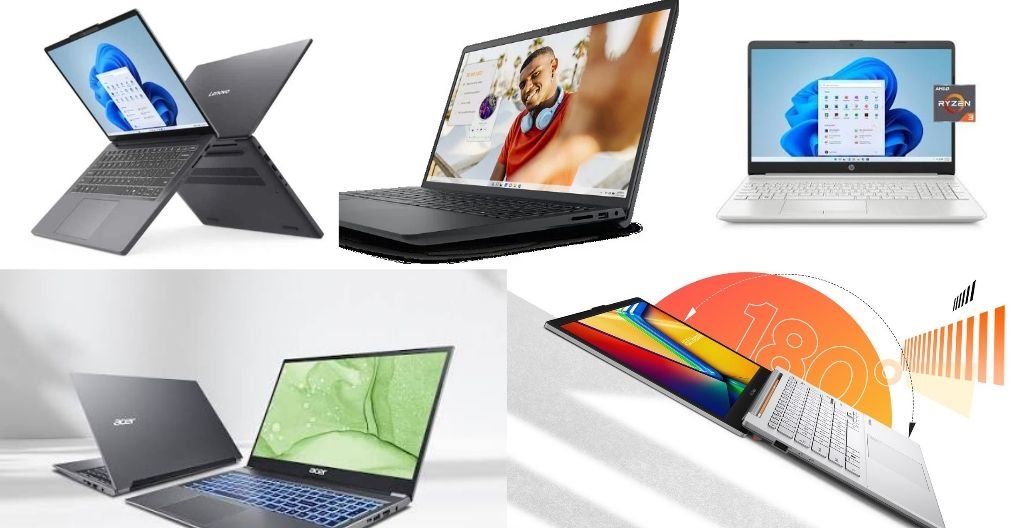
| Laptop Model | Price in India | Ideal For | Weight | Battery Backup | RAM / Storage |
|---|---|---|---|---|---|
| Lenovo IdeaPad Slim 3 | Rs 49,850 | BTech, BCA, Business Use | 1.60kg | Up to 9 Hours | 8GB DDR5 / 512GB SSD |
| Dell Inspiron 15 3535 | Rs 48,980 | All-Rounder, Long Term Use | 1.62kg | Up to 8 Hours | 8GB LPDDR5 / 512GB SSD |
| HP 15 Ryzen 3 | Rs 47,960 | Online Classes, Office Work | 1.59kg | Up to 8 Hours | 8GB / 512GB SSD |
| Acer Aspire Lite | Rs 42,990 | Tight Budget Students | 1.59kg | Up to 8 Hours | 8GB / 512GB SSD |
| ASUS VivoBook Go 14 | Rs 39,990 | Daily Travel, Lightweight | 1.38kg | Up to 7 Hours | 8GB / 512GB SSD |
Which Processor is Right for Students Under 50K? Ryzen vs Intel Explained for Your Course
This is the biggest confusion for students. Brands push different processors, but your course should decide your processor.
If you are a BTech, BCA, or Coding Student: You need multitasking and compilation power. Choose AMD Ryzen 5 7520U which comes with 4 cores and 8 threads. It is available in Dell Inspiron 15 3535. This processor handles Python, Java, C++, VS Code, 15+ Chrome tabs, and Android Studio basics smoothly. Its integrated Radeon graphics also help with light editing and casual gaming. For coding, Ryzen 5 is more efficient than Intel i3 in this price range.
If you are a BBA, MBA, Commerce, or Arts Student: You need stability for MS Office, Excel, PowerPoint, and long battery. Choose Intel Core i3-1315U with 6 cores and 8 threads. It is available in Lenovo IdeaPad Slim 3. It comes with Windows 11 Pro, Copilot key, and better single-core performance for Office apps and presentations. Intel also offers better thermal management for long classroom usage.
If your budget is below Rs 45,000: Choose Ryzen 3 7320U or Ryzen 3 5400U. These are available in HP 15 and Acer Aspire Lite. These processors are perfect for online classes, Google Docs, assignments, YouTube, Zoom meetings, and daily study without overspending. You save Rs 5,000 to Rs 7,000 which you can use for accessories.
Simple rule: For coding and engineering – Ryzen 5, For business and commerce – Intel i3, For tight budget – Ryzen 3.
Is 8GB RAM Enough or Should You Go for 16GB? Honest Answer That Saves Money
Every YouTuber says buy 16GB RAM, but the truth is different for students under 50K budget.
8GB RAM is enough for 90% of students. It easily handles online classes, MS Office Word, Excel, PowerPoint, Canva, Zoom, Google Meet, coding basics like Python and HTML, browsing with 10-12 tabs, and YouTube. With 512GB SSD, your laptop boots in 8-10 seconds and apps open quickly.
You need 16GB RAM only if you do these tasks: Heavy video editing with Premiere Pro, run Android Studio with emulator, use heavy Excel sheets with 10,000+ rows, edit Photoshop files, or keep 20+ Chrome tabs open daily with coding IDE.
My practical advice for 2026: In Rs 50,000 budget, buy 8GB DDR5 RAM that is upgradeable. Lenovo IdeaPad Slim 3 offers upgradeable RAM up to 16GB, so you can add 8GB more after 1 year when you have money. Always choose 512GB NVMe SSD, never buy HDD or 256GB SSD models – HDD laptops become very slow in 6 months and 256GB storage fills up quickly with college files.
Which Laptop is Best for Daily College Travel? Weight and Portability Solved
This is a real problem that no one talks about. Day scholars and hostel students carry laptops daily in backpacks for 2-3 KM walking and in crowded buses.
If you travel daily to college, buy ASUS VivoBook Go 14 – 1.38kg, 14-inch display, most compact and lightest in this list. Your shoulders and back will not hurt even after carrying it for full day. It fits easily in any college bag and looks premium in classroom.
If you use it mostly at home and sometimes in college, buy 15.6-inch models like Dell Inspiron 15, Lenovo IdeaPad Slim 3, or HP 15. They offer bigger screen, full-size keyboard with numeric pad, comfortable typing for long assignments, and better for watching movies and presentations.
Simple weight rule for students: Below 1.5kg = Best for daily travel, 1.5kg to 1.6kg = Manageable for occasional travel, Above 1.7kg = Heavy for students, avoid it.
How Much Battery Do You Really Need for a Full College Day? Real Backup Tested
You will not always get a charging point in college. Labs, libraries, and classrooms often have limited sockets. This is a big problem during exams.
Real battery backup for these laptops in 2026: 41Wh to 45Wh battery gives 7 to 9 hours on normal usage with 50% brightness, WiFi on, and normal tasks like Docs and browsing.
Lenovo IdeaPad Slim 3 offers up to 9 hours – Best battery in this range. Dell Inspiron 15, Acer Aspire Lite, and HP 15 offer around 8 hours. ASUS VivoBook Go 14 offers around 7 hours due to smaller battery.
Tip: Always buy a laptop with 65W fast charging. All these 5 models support fast charging where 0 to 60% charges in around 45 minutes. This helps you charge during lunch break and get another 4-5 hours backup. Also enable battery saver mode and reduce brightness to 60% for extra 1 hour backup.
My Personal Suggestion – Which Laptop Should You Buy and Why?
After testing all 5 laptops and checking student needs, here is my honest personal suggestion – not sponsored, only for students:
If you have Rs 50,000 budget and want one laptop for 4 years – Buy Dell Inspiron 15 3535 at Rs 48,980.
Why? Because Dell has the best service network in India. Even in small cities like Jabalpur, you will find Dell service center. Its Ryzen 5 7520U is powerful, build quality is strong, keyboard is comfortable for long typing, and it comes with MS Office lifetime free worth Rs 5,000. It is an all-rounder that will not give you tension for 4 years. Resale value is also high after degree.
If you are a BTech or BCA student and want future-proof laptop – Buy Lenovo IdeaPad Slim 3 at Rs 49,850.
Why? Because it has DDR5 RAM which is latest and upgradeable to 16GB, Windows 11 Pro which has extra security features, Copilot AI key for AI tasks, and 9 hours battery which is highest in this list. For coding students, upgradeable RAM is very important because after 2nd year you will need more RAM for projects. Lenovo is best for long-term use.
If your budget is tight below Rs 43,000 – Buy Acer Aspire Lite at Rs 42,990.
Why? Because at Rs 42,990 you get everything – 8GB RAM, 512GB SSD, FHD display, 8 hours battery. You save Rs 7,000 which you can use for mouse, bag, and extended warranty. For online classes and assignments, it is more than enough. Do not stretch budget by taking EMI if you have tight budget.
If you travel daily by bus or metro – Buy ASUS VivoBook Go 14 at Rs 39,990.
Why? Because at 1.38kg it is the lightest laptop in this list. Girls and students who travel daily will love it. It is compact, looks premium, and still has 8GB RAM and 512GB SSD. For Rs 39,990 it is the best deal for portability.
My final personal pick for 90% students: Dell Inspiron 15 3535. Because it balances price, performance, service, battery, and build quality. It solves all problems – coding, classes, assignments, and long-term reliability.
FAQs – Real Questions Students Ask Before Buying
Q1. Which is the best laptop for coding under 50000 in 2026?
Lenovo IdeaPad Slim 3 or Dell Inspiron 15 with Ryzen 5 7520U or Intel i3-1315U, 8GB DDR5 RAM, and 512GB SSD is best for coding under 50000. Both handle Python, Java, and VS Code easily.
Q2. Can I do video editing on laptops under 50000?
Basic video editing with Canva, CapCut, and Filmora works fine on these laptops. For heavy editing with Adobe Premiere Pro and After Effects, you need 70K+ budget with dedicated GPU.
Q3. Which laptop is best for online classes under 50000?
HP 15 or Acer Aspire Lite is best for online classes – Good HD webcam with privacy shutter, 8 hours battery backup, lightweight, and good microphone for Zoom and Google Meet.
Q4. When is the best time to buy a student laptop at lowest price?
August-September Back to College Sale and October Diwali Sale offer best student discounts up to Rs 5,000 extra off plus bank offers.
Q5. Is MS Office free with these laptops under 50000?
Yes, Dell Inspiron 15 and Lenovo IdeaPad Slim 3 include lifetime MS Office Home and Student 2021 worth Rs 5,000 free with laptop.
Also reaad:- Asus Zenbook 14 Price, Launch Date, Battery and Full Review
